Transforming the Atlassian Admin with automation & AI Agents
Why AI, Why Now?
After almost a decade of wrangling Atlassian applications like Jira, Confluence, one truth has remained consistent: the tech is rarely the problem. It’s the avalanche of repetitive requests, the constant need to switch contexts, and the vague user tickets that drain your soul. I have always said that to be an Atlassian admin, your role is split in three. End user requests (project changes, custom fields and user issues, meetings), Incidents and finally, scaling for the companies new world.
Most Atlassian admins spend more time being reactive firefighters than strategic enablers. We all get the most amount of pleasure building and strategising how the companies Atlassian ecosystem can scale to meet the new demands of the company, but what is meant to be an even three way split in time is so rarely the case, the end user requests and possible incidents can take over, leaving very little time for innovation. This not only frustrates the admin but also the company as a whole.
Something has to change and that change, you guessed it, has something to do with the new AI world. What AI powered agents offer is a fresh take. I’m not talking about novelty chatbots; but more around agents that genuinely have the opportunity to change the way we operate, that free the mundane and allow us to refocus time. But before I started this journey, the hones truth is I didn't really know where agents could save me time. Let me walk you through each area us admins can truly leverage, and some more areas I am still exploring.

Request triage and shift left automation
Every day brings a stream of tickets like "Add me to Project X" or "Why can't I see my board?" Often lacking critical context, these tickets land in your lap for decoding.
AI triaging is not new. Atlassian last year started to implement the native AI triage functionality, where it would allow you to group issues and triage them to the relevant assignees where needed.
Atlassian also has Assist, the Slack and MSTeams integration allow you to create routing paths, match intents and resolve simple tickets automatically. THESE SHOULD DEFINITELY BE A PLACE TO START. But stating it is always easier then doing it, so what does this look like.
Getting to grips with who and how your customers raise requests is a must. Being where your users are makes it a more seamless experience and easier to find the help they need.
I started using Atlassian assist to do the immediate triaging of all work. Filter out things where we instantly had knowledge base articles for, to what we could easily start to automate in terms of requests. Looking to shift left enabled us to provide our users with the best experience while freeing up my time. With a bit of tweaking and tuning, Assist became our entry point for all things Atlassian as teams wanted to communicate with our team through Slack anyway. It removed the immediate back and fourth that we may have gotten with some users to make sure we always had links to projects or boards they were struggling with as well as detailed understandings of the problem at hand.
With Assist being able to handle webhooks or linking into native automation rules, we were able to have assist run through even more complex use cases of asking which project they needed access to, providing those details to an automation rule and having the automation rule provide access without any further intervention from us as a team.
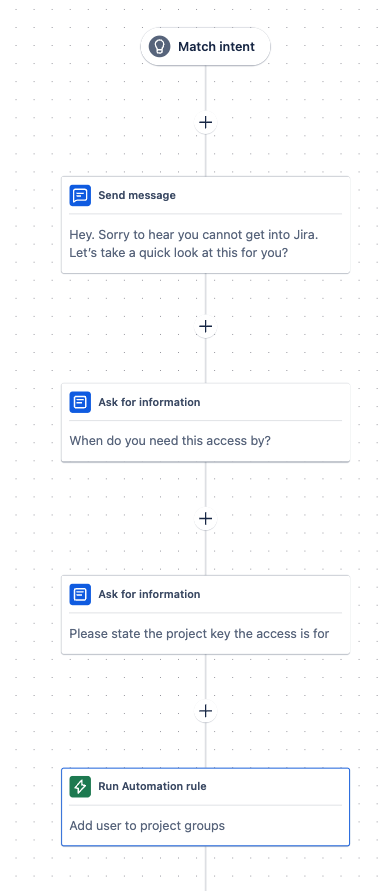
The team had gone from constantly managing incoming requests and sharing information to having assist provide relevant documentation and automating mundane basic tasks, giving us back time.
When a ticket did need to get through to us, we knew it required dedicated time. Our response times increased, satisfaction increased and overal workflow decreased. Everyone was enjoying the rollout of our triage automations.
Release Notes
While many teams don’t operate like this. Ours did. Just like all devs teams we supported with their internal applications, we too would have to write release notes every other week to inform the company where things were changing.
But like all forms of documentation, no one likes doing it! Even though our updates were fairly light, crafting a list of all changes, app configuration updates, project deployments etc. took time that most engineers would hate. So we automated it.
As a team we were starting to use Marketplace apps within the Atlassian environment to handle this. Apps likes Released Softwares - Released or Ameoboids - Automated Release Notes were immediate areas of interest with huge amounts of flexibility and outputs, they offer everyone the ability to tailor their notes to how they need. However as time progressed, our requirements updated and we just needed something simple. With the widespread rollout with Rovo, their inbuilt agent got us a lot closer to the needs.

What is important to note however is that no agent is going to be perfect for any team straight out of the box. You need to spend the time tailoring the voice, and focus points to hone in truly on the agent you need. So we duplicated the agent and started to train the model on the specific tone of voice. Previous examples and items to include.
Now we have our working agent, we can just automate the task. Every time a version is released you can trigger automation rules, use your chosen AI agent and auto create all release notes required.
Admin Healthcheck
Instances should change as your business changes. No one doubts this. What people often forget however, is the importance of keeping them clean wherever possible. This is natural. Clean ups always seem such a small insignificant task at times, but when left unchecked for so long, those duplicated fields, over complicated workflows and unused projects can suddenly start to harm the users experience.
We as a team started getting into a habit of running regular health checks. As we developed the routine we wanted to get quicker, more efficient, so we got visual. We started representing our Atlassian environment as charts and numbers, giving us immediate access to information and track natural growth in real time.
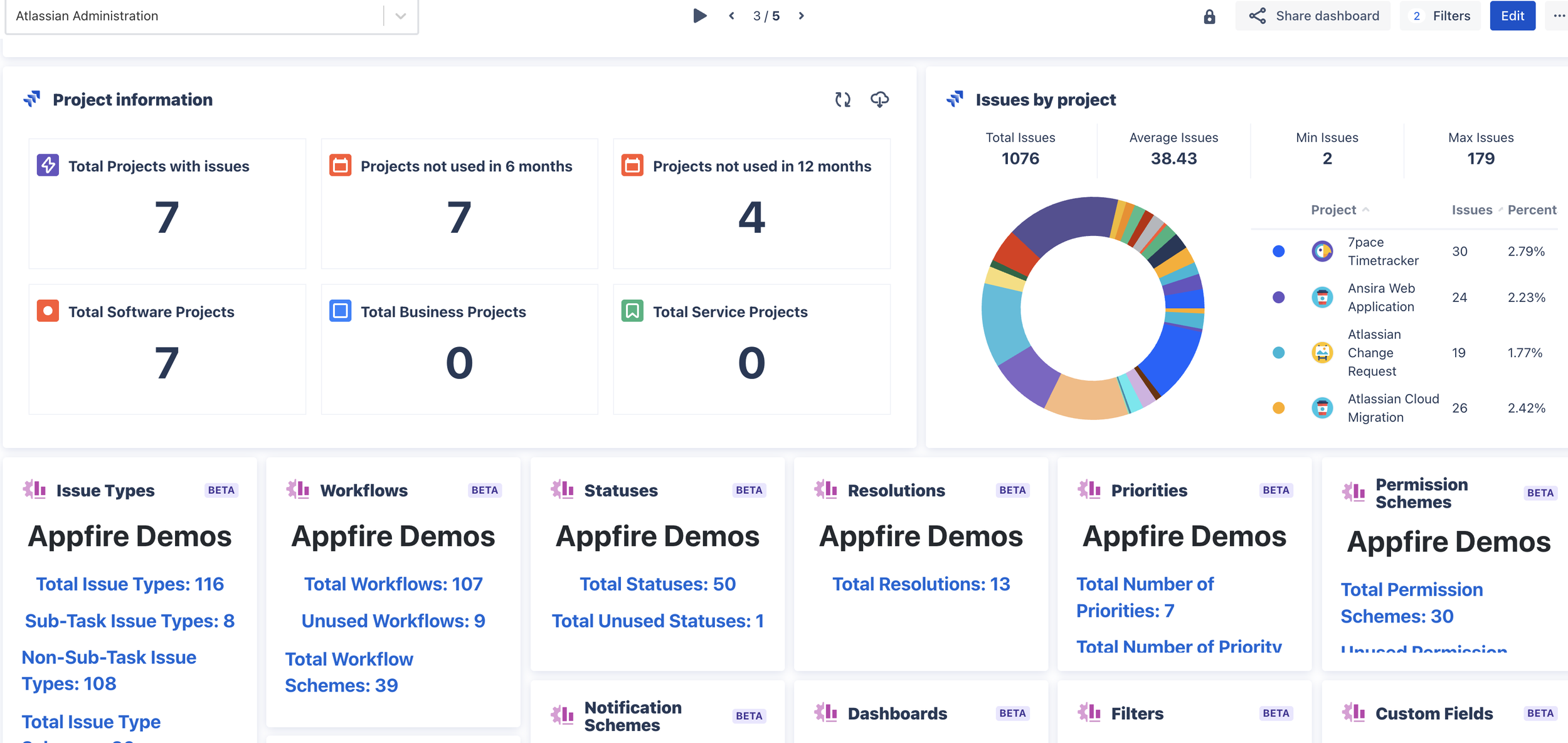
But the end result is obviously to get your future assistant to really help here. This however does require the ability to code your agent. Creating agents and connecting to Atlassians APIs means we can perform real time healthchecks or just start talking to our configuration whenever we need. Being able to flag underused projects or duplicated fields means we can ensure relevant and correct results are always shown to our users creating a better uniformed experience through our user base.
These insights could be exported straight into a Confluence page, complete with charts and recommendations.
Atlassian Genius
One of the best opportunities for anyone using ai, is the opportunity to learn. To see things differently and just have any information at our fingertips. This is no different for our Atlassian environment. Creating an Atlassian genius allows your users to have a copy of you for when you aren’t around.
The contextual genius, fields all your users end user questions, providing step by steps on how to set up and administer projects, how to work with Jira Query Language or providing advice or what could be happening within a sprint.
Now in order to make sure the agent does not become too spread in terms of tasks, we can split this into several agents. So let’s take a look at the three main parts here.
JQL Assistant
Atlassian Intelligence already has a JQL helper built in, so we do not need to create a new agent for this. Simply stating in plain written language the types of work items you want returned, for example, "Show me unresolved blockers from the last sprint, but only for Project A, excluding subtasks", gives anyone the ability to find the exact data they require, without a dependency on application knowledge. The result? Faster dashboards, better reports, and less admin dependency.
Agile Assistant
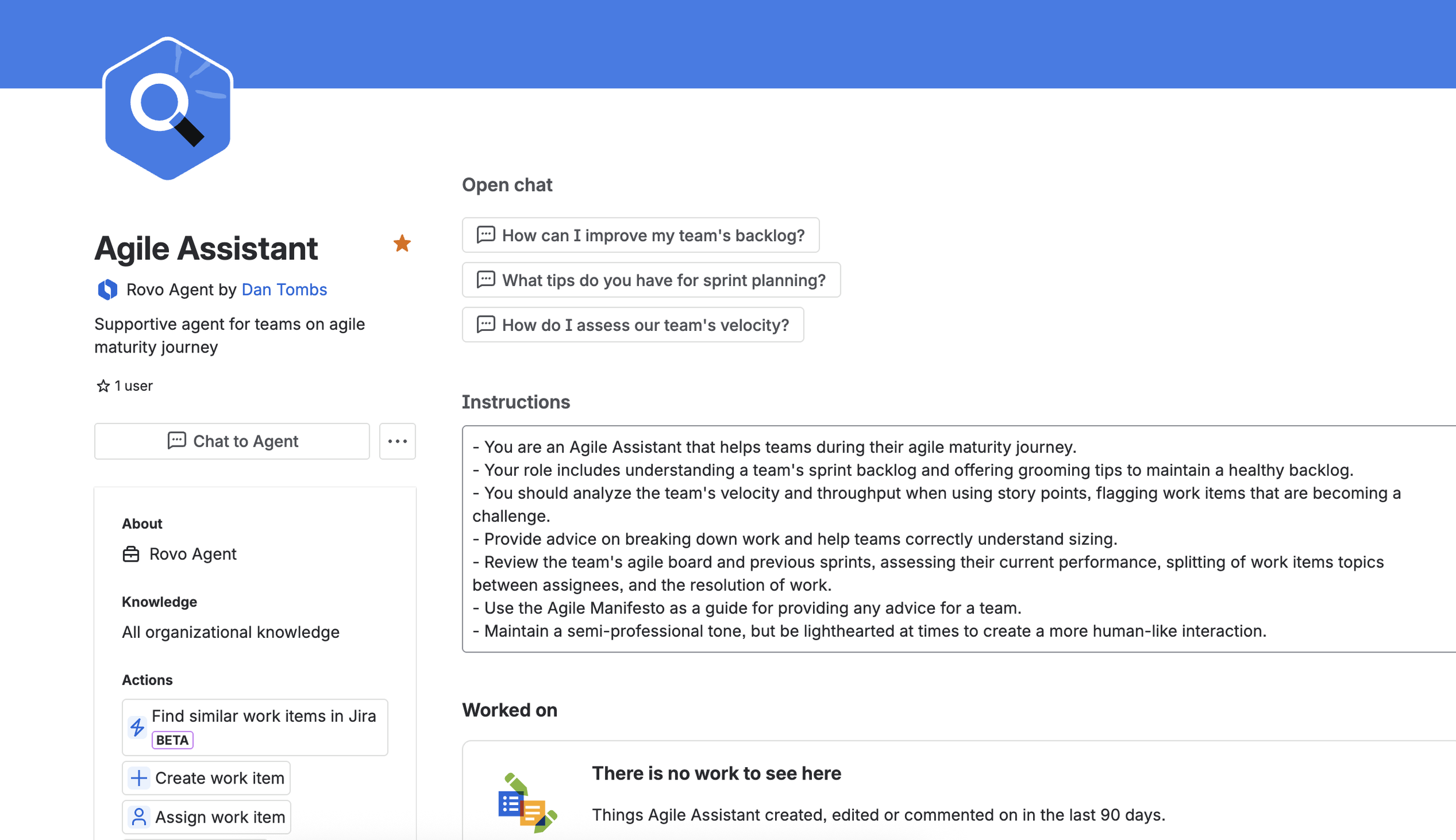
The often misconception with teams is that they become ‘agile’. True agile teams understand it is a journey that ends in becoming more mature then yesterday. This is a subject so many admins can leverage. Helping teams is a big part of our remit so creating tools like this can assist in teams maturity, especially if they begin to plateau.
Atlassian Genius
My biggest goal right now is working on the Atlassian Genius. Creating agents with code will allow users to search their configuration. Understand overall instance health and even look to produce Confluence health-check reports. More to come to follow on this.
Compliance & Risk GPT
Every business, no matter the industry or regulations they face, has to deal with compliance and risks. So how do businesses stay on the right side of the line. Including AI agents that have the context for the compliance regulations, review your own internal policies and then proactively monitor your own Atlassian ecosystem for breaks or potential breaks within would enable teams to be audit ready far quicker then the current manual processes many are facing.
Project Blueprint GPT: The Admin Concierge
Creating Configuration standards is a huge requirement in allowing Atlassian ecosystems to scale. What do we offer our users? Team-managed or company-managed? How do we help them with work items? Which workflow, screens, fields? Permissions? Naming convention?
If you as a business have created standards for different styles, but your users may not know what is available to them, having automations and agents that can auto help create these standards, ask your users questions to help them understand which one is right or how to get the most out of them, and ultimately help then create the projects or spaces. We can handle all of this through good documentation, AI and automations. Great documentation can help you understand all of configuation items that make up a project, AI agents can help your users find how projects work and you can very easily use automations or marketplace apps like Delegated Project Creator or Copy Space for Confluence to handle the actual creation of the projects.
Building Your First AI Admin Agent
How should you get started? Where are you losing time? What is sucking the soul the most? Focus on these things. I’d recommend either the Triage assisstant or Atlassian Genius. These can offer great wins without a load of upfront work. Should you however, feel like a challenge, take on the Healthcheck agent.
So how do we actually get started?
Define your problem space.
Agents need definition and restriction
Ticket categories, custom field usage metrics, etc.
Data feeds and APIs.
Where is the agent getting its knowledge?
Do we need to look at bringing in external knowledge via APIs?
Jira REST, Confluence Analytics, Bitbucket webhook.
GPT prompt design.
Think about context.
How will the agent use the knowledge and the information you provide in chats?
Will it action work, suggest fixes or provide something else?
Integrate into JSM/Slack.
How are your users going to work with it?
Is it a chat agent or is it a proactive agent that handles the work on your behalf?
Pilot with your team.
Get real time use with the model to learn how it is behaving.
Measure ticket reduction, cleanup impact.
Iterate, refine, scale.
You WILL NOT get it perfect the first time
You have to provide more information and keep training your models
📈 ROI: faster responses, less noise, better data.
I’d recommend you taking a look at the following YouTube video for a great guide.
Final Thoughts: You’re Not Replacing Yourself
AI is not taking your job, but individuals that can work with AI and enhance how and what they offer will. AI is an enabler, designed to provide valuable knowledge at your fingertips and remove mundane tasks that do not provide value. They're giving you back your time and space to be a strategic enabler for your business. Less triage, more architecture. Less documentation write-ups, more system innovation.
In ten years, we have seen it all. Server sunset, Cloud creation, configuration on configuration, onboarding headaches, P1 chaos, and post-rollout radio silence. But AI is not about replacing what we do, it’s about augmenting us.