Why are companies interested in ChatOps?
Remember when the service desk was just email chains, frantic phone calls, and the occasional sticky note slapped on a monitor? Thankfully, those days are long behind us. Today, service teams live in a world where speed and visibility matter just as much as technical know-how. We have moved on from the world of just emails to portals and multi channel service teams, And that’s where ChatOps enters the picture.
At its heart, ChatOps is about meeting people where they already work — in Slack, Microsoft Teams, or whatever collaboration tool your company uses. Instead of bouncing between Jira Service Management (JSM), email, and chat, your agents and ops teams can collaborate, take action, and resolve issues without leaving the conversation. It’s smoother, faster, and frankly a lot less painful.
For companies new to the concept, the idea of plugging your service desk into your chat platform can sound like “just another integration.” But done well, it’s a game-changer. It reduces context switching, speeds up incident response, and makes both employees and customers happier. Even better, Atlassian has already built solid native options into JSM — and for those who want more, Marketplace apps like HelpDesk+ or Chat for JSM push it even further.
Why ChatOps Matters in a JSM / Service-Operations Context
You probably already sense this, but when service operations or your service desk teams adopt ChatOps, the gains go beyond just “less context switching.” Here are a few of the biggest benefits, especially relevant when you’re using Atlassian / JSM:
Faster Incident / Ticket Response & Resolution
When alerts, tickets or requests show up in the same chat tool your teams already monitor (Slack, Microsoft Teams etc.), the latency of getting someone to see an issue drops. You can create war rooms, assign responders, escalate – all from chat. Atlassian’s in native ChatOps for JSM does exactly that: alerts + incident notifications + channel creation + actions from the chat.
But from a customer perspective, a customer can easily raise a request right from where they would be working with your product or service. This provides a quick entry point to the service team.Reduced Context Switching & Increased Focus
Switching between tools (email, portal, Jira, chat) eats time, causes mental load and mistakes. For your service teams specifically, with ChatOps integrated, people can act on issues / alerts / tickets without leaving Slack or Teams (or without jumping in and out). That means fewer forgetting to update things, fewer delays. Atlassian’s built-in integrations allow many actions (status changes, priority, etc.) from chat.
By offering chat as a channel of entry for your customers means there is less context switching on their behalf to get to resolution. Your team can continue to act on issues from their normal working point, whether this is in Slack or from JSM, while still allowing customers to be where they want to be.Better Visibility & Transparency
Because everything is logged (chat messages, alert summaries, incident comments), you get a richer audit trail for post-mortems, for knowing who did what, when. It also helps people outside the immediate ops team (e.g. communications, legal, stakeholders) stay in the loop. By offering more channels of entry, you can also get more of a sense of customer frustrations, as while it may seem more tickets, these frustrations still existed, but are offering a cleaner experience to have them raised. This offers you as a team to hear and resolve their frustrations and understand general customer sentiment better.More Efficient Use of Resources & Automation
Once requests can be turned into tickets automatically, auto-responses / knowledge-base suggestions can deflect simple issues, routing can be simplified. Agents spend less time on repetitive tasks. Apps like HelpDesk+ show this in action.Improved Customer / End-user Experience
If someone can ask a question in Slack, MSTeams, mobile, through external websites or through chat on your portal and get a fast response (or even an automated suggestion), satisfaction tends to rise. Also, quicker incident communication (internal + external) helps reduce frustration. Atlassian Assist (and ChatOps for JSM) support conversational ticketing.Better SLAs, Metrics & Process Discipline
With everything in a more structured flow, you can track SLAs, measure resolution times, observe bottlenecks. You can enforce workflows (approvals, priority escalation etc.) with fewer manual “do-this-copy-that” steps.
Native Atlassian / JSM Capabilities for ChatOps & Alerts
Before buying or installing apps, it’s good to understand what Atlassian / Jira Service Management already offers. These are things you likely get “for free” (or with minimal set-up), which may already solve much of what you need.
| Feature | Description | What this enables |
|---|---|---|
| Atlassian ChatOps (for Slack, Teams, Zoom, etc.) | You can connect JSM to Slack or Microsoft Teams so that alerts, incident notifications, and even war room channels / meetings are created directly from the incident in JSM. Also, you get action buttons or commands in chat to update priority/status etc. | Real-time, less friction in incident response; ensures critical context is shared quickly. |
| Atlassian Assist / Conversational Ticketing | Within Slack or Teams: people can raise requests, use emojis or message actions to convert messages into issues; bi-directional sync. Agents can respond from chat or portal without switching tools. | Makes the service desk more accessible; reduces delays in request creation and communication. |
| Alerts & Monitoring Integration | JSM integrates with alert systems; you can choose which alerts go to which chat channels, and configure filters. Also automation in JSM can trigger Slack channel creation etc. | Helps separate noise from critical issues; ensures the right people get notified. |
| Approvals & Required Fields via Chat | Some request types / approvals can be handled via chat (especially via Assist in Slack/Teams). For example approvers can approve/deny without going into Jira site. | Speeds up request fulfilment; avoids blockers where someone needs to go to Jira just to click “approve”. |
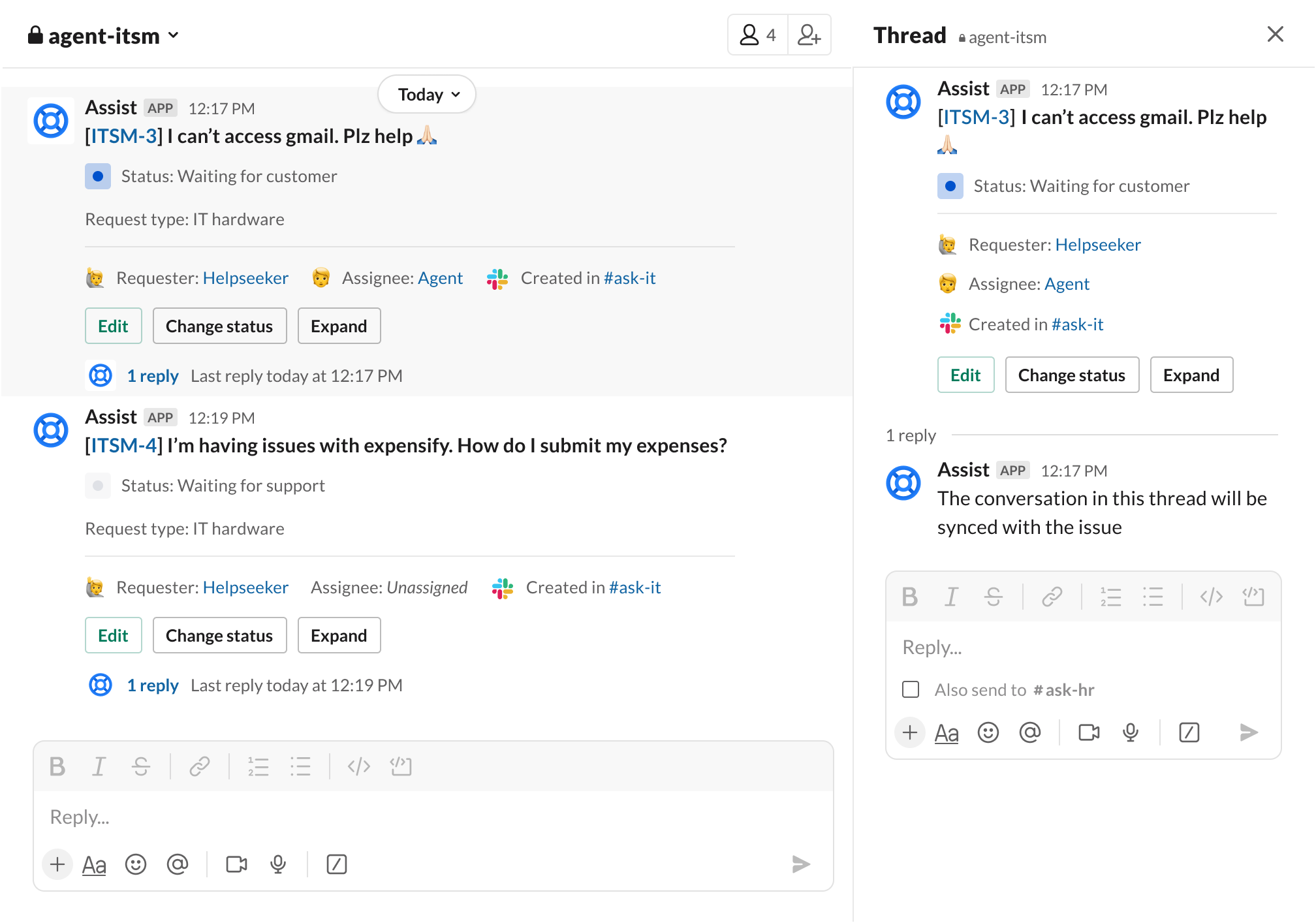
These native pieces often cover “Phase 1” of a ChatOps journey: alerts + notifications + some actionability in chat + converting requests from chat.
Marketplace Apps & Enhancements to Consider
If the native features aren’t enough, or you have specific needs (e.g. more automation, different chat channels, customer-facing chat, multichannel support, custom workflows), then Atlassian Marketplace apps are your friend. Here are a few options and what they bring.
| App | What it adds / differences vs native | Use cases where it’s especially helpful |
|---|---|---|
| HelpDesk+ (by Appfire) | Full two-way integration between Slack (and MS Teams) and JSM. Automates ticket creation from Slack conversations. Smart auto-responses. Sync of replies/comments. Mapping of request types to channels. Off-hours settings, etc. | If you have a lot of requests happening in Slack already, want to reduce portal/email dependence; you want more control over routing & notifications; better customer satisfaction. |
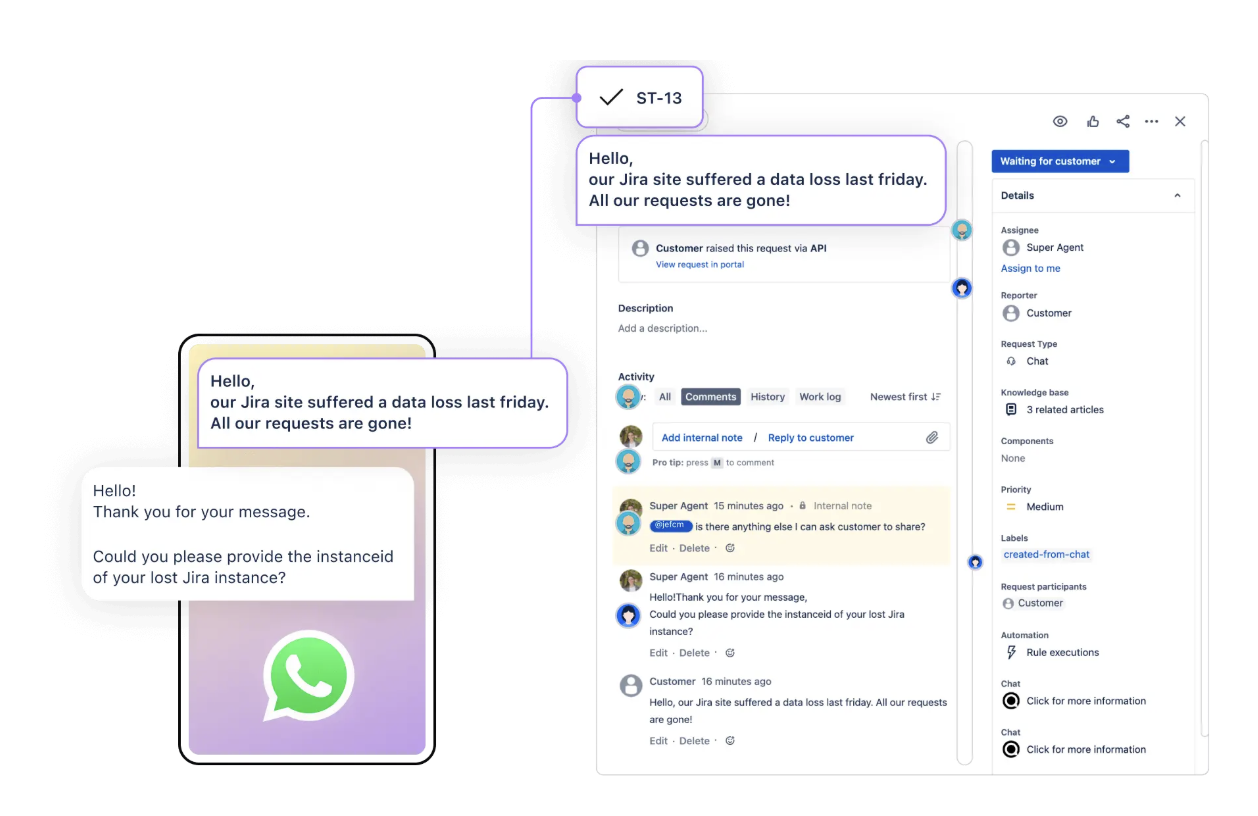
| Chat for Jira Service Management (Appfire) | Adds real-time chat widgets on portal/websites or anywhere your customers are interacting with your product or services; work with a chat dashboard; ability to convert chats to JSM requests, WhatsApp integration allowing for on the move conversations, perfect for remote staff. Helps manage customer-facing chats. | When you need a customer portal / website live-chat feature; when external users need more direct and responsive support channels or on the move support. |
| Microsoft Teams / Slack Integration Apps (other vendors) | Sometimes they offer richer functionality than the base Atlassian Assist: more flexible customisation of notifications, ability to use custom fields, status updates, linking Slack threads to tickets etc. Examples include “Microsoft Teams for Jira & JSM” by yasoon. | If your organisation is heavily using Teams or Slack, especially cross-departmentally, and you need uniform integrations, secure routing, or compliance. |
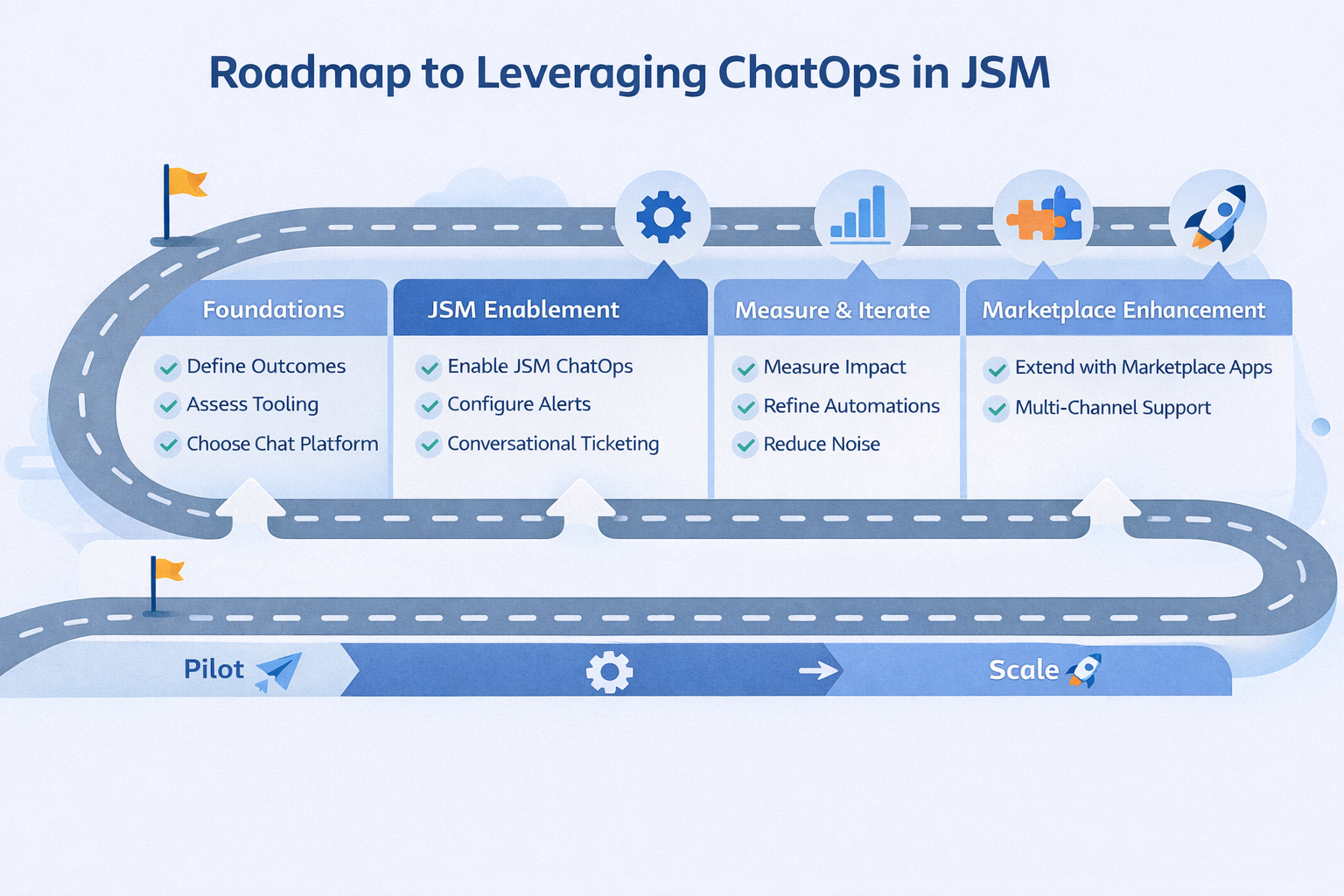
How to Start Leveraging ChatOps in JSM
If your company is new to ChatOps / conversational service-desk work, here are steps I’d recommend. Think of this as a phased approach. It helps avoid over-engineering upfront, yet gives you quick wins.
Define your goals & priority use cases
What do you want to improve first? Faster incident response? Better visibility? Lower ticket volume? Better customer satisfaction? Lower delay in approvals? Pick 1-2 high-impact use cases to focus on. For instance, “when an alert of severity ≥ X happens, notify in Slack + create incident channel + assign responders” could be one.Assess current tool stack / existing chat platforms
Which chat tool(s) do you use (Slack, MS Teams, etc.)? Do you already have JSM set up, with alerts feeding into it? What integrations exist? What’s your knowledge base setup? Who are your stakeholders (IT Ops, DevOps, Support, HR, etc.)?Start with native Atlassian functionality
Enable Atlassian ChatOps for your JSM instance; connect Slack / Teams.
Define channels: one for agents, one or more for requesters, war rooms etc.
Set up alert rules and configure which ones feed into chat, which don’t. Use automation in JSM to create Slack channels automatically for incidents.
Try out Atlassian Assist / conversational ticketing: let people raise tickets via chat, monitor them, respond, update status etc.
These steps often already yield major improvements.
Measure & Iterate
Before starting, make sure you take and understand the baseline. After initial rollout, collect the same metrics again: number of tickets created via chat, response times, time to resolution, customer satisfaction, volume of escalations, number of alert channels etc. Use that data to adjust: which alerts are too noisy? Which automations aren’t working? Which chat channels should be separated? and overall is it helping or hindering?Add in Marketplace Apps When Needed
If native features are limiting, then evaluate apps like HelpDesk+, Chat for JSM, or Teams/Slack vendor integrations. Evaluate them against criteria such as:Are they improving your current processes or making noise?
How well do they integrate / sync with JSM?
Can they handle both internal (employee) and external (customer)-facing scenarios?
What customisation / control (custom fields, routing, automations) do they provide?
Security, auditability, compliance, privacy.
Cost vs benefit (licence fees, maintenance).
Define Processes & Guard Rails
Rules for alert thresholds to avoid alert fatigue.
Define who gets added to incident channels, who owns what.
Approval processes, on-call responsibilities.
Permissions: who can perform chat actions that change ticket status etc.
Fail safes: channels for escalation, fallback if chat integrations fail.
Train & Evangelise
Teams need to understand the new workflows: how to raise tickets in Slack/Teams, what expectations exist (e.g. response SLAs), how to transition from chat to formal incident management. Also train support agents and stakeholders to use these tools and follow protocols. Encourage feedback from them.Refine & Expand
Once basics are working, expand: more request types, more chat channels, integration with other tools (monitoring, CI/CD, observability) so alerts from other systems piped into chat + JSM. Possibly virtual agents / chatbots to deflect, knowledge-base suggestions.
Things to Watch Out For
Because ChatOps adds power, but also adds risk / complexity. These are often “lessons from the field” things to keep in mind:
Alert fatigue: too many non-critical alerts in chat = people ignore them. Use filters, severity thresholds.
Noise vs signal: Be intentional about what gets into chat; distinguish internal vs external, avoid sensitive or irrelevant information.
Data sovereignty / compliance: If customers are external, or you work in regulated industries, ensure that data in chat (exports, logs) is handled per compliance / privacy rules.
Managing cross-team communication: ChatOps tends to draw in multiple teams (Dev, Support, Ops, HR). Make sure there are clear lines of engagement when something may pass hands.
Cost / maintenance of apps: If you require marketplace apps, understand the cost and maintenance for them. Understand the benfit to cost ratio and whether this is worth it.